
The Quitzilla alternative built for iPhone.
Quitzilla made quitting bad habits feel countable. Unlooped picks up that idea and rebuilds it around your iPhone, your privacy, and the day a slip happens.
If you searched for Quitzilla and found it is best known on Android, or you want a quit tracker that does not restart you at zero, here is how Unlooped compares.
What Quitzilla gets right
It made quit counters simple
Quitzilla popularized the clean sobriety-counter approach: pick a bad habit, watch the time and money saved climb. That core loop works, and it helped a lot of people.
Multiple habits in one place
Rather than one app per vice, Quitzilla lets you line up several bad habits and see them side by side, which is honest about how habits actually cluster.
Reasons and motivation up front
Writing down why you are quitting and keeping it a tap away is a genuinely good pattern, and Quitzilla built it into the flow early on.
Why people switch to Unlooped
Native on iPhone and Apple Watch
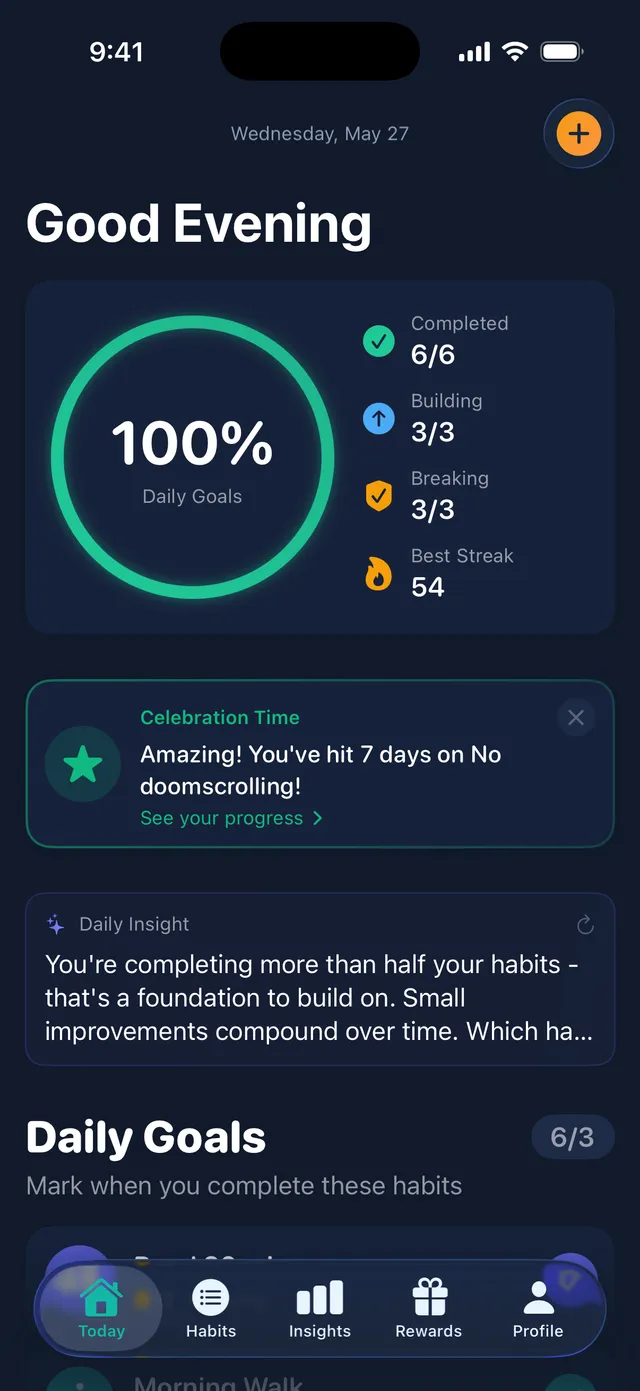
Unlooped is built for iOS from the ground up, with home screen widgets and a full Apple Watch app, so logging happens where your habits do.
A slip does not erase your progress
Progress in Unlooped is milestone-based. Log a setback and your history, milestones, and money saved stay intact, so one bad night stays one bad night.
A coach instead of a quote
When a craving hits, Craving SOS and an on-device AI coach talk you through the moment, which goes further than a motivational quote on a counter.
Private by design
No accounts, no servers, and Face ID locking for habits you want out of sight. What you track never leaves your iPhone.
Unlooped vs Quitzilla at a glance
| Unlooped | Quitzilla | |
|---|---|---|
| Platform | iPhone, with an Apple Watch app and widgets | Best known as an Android app |
| Price | Quit mode free forever. Premium is $1.99/month or $9.99/year | Free tier with a paid upgrade for more habits and features |
| Quit and build | Both modes in one app: break bad habits and build good ones | Focused on quitting bad habits |
| After a slip | Setback logged, history and milestones stay intact | Timer-style counters typically restart from zero |
| In-the-moment help | Craving SOS plus an on-device AI coach | Reasons lists and motivational quotes |
| Accounts and data | No accounts, no servers, optional private iCloud sync | Local app; backup options vary by version |
Based on publicly available information about Quitzilla at the time of writing. Features and pricing change, so check their site for current details.
Why iPhone users go looking for a Quitzilla alternative
Quitzilla earned its reputation on Android, and that is exactly where the friction starts for a lot of people. You read about it in a thread, search the App Store, and either cannot find what you expected or find something that does not feel like the app everyone described. An iPhone deserves a quit tracker that feels native to iOS: real home screen widgets, an Apple Watch app for logging without pulling out your phone, and Face ID integration instead of a passcode bolted on.
Unlooped is that app. It is built only for iPhone and Apple Watch, so the interactions Quitzilla users love, the day counter, the money saved, the list of reasons, are all here in a form that fits the platform. And because the quit mode is free forever, trying it costs nothing but the download.
The counter reset problem
Most quit apps, Quitzilla included, are built around a timer. That works beautifully right up until the night it does not. Slip once and the proud number you have been protecting snaps back to zero, and for many people that reset reads as you failed, start over. It is one of the most common reasons people abandon a quit attempt entirely: if the app says you are back at day zero, why not wait until Monday, or January, to try again?
Unlooped treats a slip as a data point, not a verdict. You log the setback, note what led to it, and your history, milestones, and savings stay on the board. The app is honest that the slip happened while refusing to pretend the previous forty days did not. That framing keeps people in the game the morning after, which is when a quit attempt is actually won or lost.
Quitting more than one habit at once
Habits cluster. The late-night scrolling feeds the bad sleep, the bad sleep feeds the energy drinks, and the energy drinks feed the 2am snacking. Quitzilla understood this and let you track several bad habits together, though the free tier caps how many you can line up. In Unlooped, quitting is free, and you can point it at the whole cluster: each habit gets its own counter, milestones, and money saved.
There is a practical benefit to seeing them together. When two quits share a trigger, your own log makes the pattern visible, and the on-device coach can help you talk through the moment that usually knocks over the first domino. You stop fighting five separate wars and start managing one system.
From quitting to building
The most durable quits usually involve a replacement. The smoke break becomes a short walk, the doomscroll becomes ten pages of a book, the nightcap becomes an earlier bedtime. A dedicated quit counter cannot see that half of the story. Unlooped ships both modes in one app: quit trackers for what you are leaving behind and build trackers for what you are putting in its place.
In practice this means your evening can hold both goals at once: no energy drinks today, and a walk logged. Watching the build streak rise as the quit counter climbs makes the trade concrete, and it gives the restless energy of a craving somewhere useful to go. That is the part people tell us finally made a quit stick.
Your progress stays yours.
Quit data is sensitive almost by definition, whether it is drinking, nicotine, or anything else you would rather not explain. Unlooped keeps all of it on your iPhone: no account to create, no server that stores your counters, no analytics profile of what you are trying to quit. Habits you want fully out of sight can sit behind Face ID, invisible even on an unlocked phone. The only sync is optional private iCloud between your own devices. We cannot see what you track, because it never reaches us.
Unlooped vs Quitzilla: frequently asked questions
Related guides
Practical, judgment-free reading while you decide which app fits.
Best habit tracker for addiction recovery
Recovery is hard enough without an app that wipes your day count over one slip. Unlooped credits clean days itself and keeps Craving SOS one tap away.
Best habit tracker for quitting bad habits
Quitting a bad habit means a hundred moments where an urge hits and you need help in your pocket. Most trackers add habits; Unlooped quits them too.
How to break a bad habit
A bad habit is hard to break because it solves a real problem for you. Map the cue, routine and reward loop, treat a slip as data and change how you quit.
Try the private alternative.
Download Unlooped and keep your habits, and your data, to yourself.